
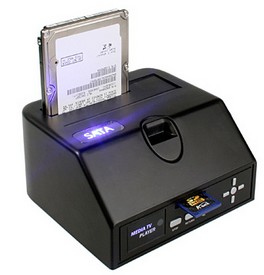
This new SATA HDD Multimedia Dock not only accepts 2.5/3.5 inch hard disks and SD Cards but will deliver multimedia content like video and audio from the disk to your television without a computer. Now that’s cool. So you can drop in your disk full of photos or MP3s, hook the thing up to your HiFi or TV and play it all without missing a beat. Now that’s cool. Did we say that already? There is however one tiny hitch, the thing only streams FAT32 formatted disks, which is a bit naff, eh? Ah well. $84.00.
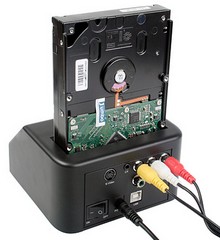
This SATA HDD Dock allows you to connect any 2.5″ or 3.5″ SATA Harddisk to your computer via USB. A powerful tool for data transfer, backup and cloning. It functions as a Media Player as well. You can play your media files via SD card or external USB storage on TV without using a computer. It is a great gadget for you to share your videos and pictures with your family and friends. The device is compatible with both PCs and Macs.




Wow, that’s pretty neat.
I’ll betcha though, in a month they’ll release a version with full flash card format compatabilty, and then a month later with usb hub compatability.
Cool device, but it seems odd to see unprotected hard drives encouraged to be carried around like that. But it would be worth the money just for USB drives and SD cards, IMHO.
Downside is that, judging from the pics, it only has composite and S-video outputs. If I would buy something like this I would make sure it had an HDMI port.
I bought one of these and I can see the same limitations two years later. What would be nice is a network connection (wireless would be good but wired is OK)
You see I can’t link it to my PC by USB (too far) so I have to, either, unplug it all (complete with power supply) and reconnect it upstairs, or copy everything to my laptop, connect via USB and copy it again.
There isn’t (on mine) enough horsepower to run music or video from an SD card.
All I really want is a HD solution that I can dump stuff direct from my PC (in a different room) and view/listen in comfort.
Oh and while I have wishlist going, why can’t I have an MP3 player that is a simple, barebones device and plugin my own flash drive to it? That way I could have a drive with dance music, a drive with classical, a drive with Englebert… James Last… Mantovani… the list is endless.
And don’t tell me to buy an iPod – I’m not that trendy! :�)
Sorry, I’m clearly rubbish at this HTML malarky!