
I spent a few weeks wandering around Europe and Scandinavia this summer and learned a few things about catching mobile broadband access at the right kind of price which I thought I might share with you. First off, mobile broadband roaming is disgustingly expensive if you do it via the normal, use your own SIM card way.
Data roaming prices are the 21st century form of piracy, and the sooner the authorities clamp down on it, the better. That said, there are ways to avoid the pain and get a reasonably good experience travelling with your laptop, and I’m not talking about WiFi either, but proper, use anywhere 3.5G or similar.
- First thing – WiFi availability sucks. If you want to grab high speed broadband via WiFi anywhere other than a hotel or airport it’s a lottery in most countries. In fact it’s worse, so forget it. You’ll need to think 3G USB mobile broadband dongle, which will work anywhere a mobile phone will, although admittedly not always at broadband speeds.
- So before you set off, grab yourself an unlocked Huawei 3G modem/dongle from eBay. It’ll set you back £40–£50.00 but it saves a lot of time and hassle.
- If you already have a Huawei 220 or similar and want to unlock it, then you’ll need to download and use the KulanKendi MultiClient unlock software (www.kulankendi.com/index2.php) which lets you unlock most modems on the market for around €15.00 or so. It’s a bit of a fiddle, your dongle will need the right firmware etc etc, but it can be done if you’re patient and persist (read the manual!). Don’t forget you’ll need to click the ‘get Login/Password’ button on the program main page and enter in your Paypal transaction code to get access to the Unlock function.
- Once you’ve unlocked the dongle you can use any SIM card you want to grab Internet access, and this is where the fun comes in.
- I’ve only done it with Sweden and Italy so far, but there’s no reason to suppose it won’t work elsewhere. Before you travel, visit www.prepaidgsm.net/, click on National Operators, select the country you’re visiting and run through the prepaid SIM cards on offer, looking for special data deals. The Prepaid Offer link is the useful one.
- Once you’ve located an offer, note it down and catch your flight. Or whatever.
- Now here’s the tricky bit. Depending on where you are in the country you’re visiting, one or more offer may apply. The trick is to find a local mobile phone shop in the area you’re staying and walk in looking confident, and ask for the ‘special data deal’ in a loud voice while flourishing your 3G dongle. Of course the right language helps, but hey just go with the flow.
- The store staff will look confused, get the manager, there’ll be much talking on phones in foreign languages and eventually they’ll come back – if you’re lucky – with the right kind of flat rate Internet deal that you want/need. It’ll normally be something like £10/€20 a month for a large amount of Internet, all paid up front.
- If you’re unlucky in one store, try another. If you’re unlucky in every store then sorry that’s the end of the line for a cheap service, and you’ll have to revert to your expensive home SIM pain.
- Pay the store the cash up front as requested, hand over ID if asked, grab the SIM, activate it by making a call (or whatever other requirement they have) and you should be good to go. You’ll need one piece of information to enter into the Huawei modem software, which is the APN, so don’t leave the store without it. It’ll be something like itbox.tim.it or something in a similar format depending on the country and service provider. Just fire up the software, go to Tools – Options – Profile Management, click the New button to add a new service provider, enter the APN, click OK and you’re ready to start connecting at reasonable speeds.
- You won’t get the advertised fastest speeds of course, but if you log on at 200kbps as I did in the middle of the Italian mountains miles from anywhere, with no transfer cap to speak of, you’ll still be a very happy bunny I suspect.
- Do remember also that you can use these SIMs in your unlocked 3G mobile phone handset, as I did to access my email on my Nokia N82 when the laptop packed up. It’s not as two-way fast keyboard handy, but you can certainly get most simple communication and surfing things done at the right price.
That’s it. Hope it’s been useful. If you’ve got any other methods, products or suggestions speak up in the comments, because I’m still learning and would like to have a selection of options to choose from when travelling if possible. Let’s face it, you can’t always find an Internet cafe when you need one, can you?





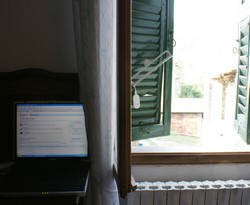
Don’t forget to pack an extra long USB extension cable so you can hang the modem out the window like the photo above!!
Nice article. I am going backpacking around the world for 12 months with a Fujitsu UMPC and a Vario HSDPA 3G handset. Some countries I’m only in for a week (european ones) whilst others I will be there for many weeks (India, Japan, USA)
I would like to use SIM cards to get 3G and then have my own hotspot I can share with the UMPC.
As a followup I would like to see a guide which shows the cheapest available options for 3G in each specific country with different usage scenarios. It is hard to find concise info and data through the prepaidgsm website. The Indian carriers haven’t been updated in 12 months, and that’s an eternity in the 3G timescape.
Hi there, I’m italian.. but how did you manage that the italian carrier tie you with a 24 month contract for that kind of deal?!
@trugoy: Nope, there are special pay as you go deals everywhere, you just have to be prepared to dig them out and fight for them. :-)
@Adam: try this wiki at http://prepaid-wireless-internet-access.wetpaint.com/?t=anon
Excelent article. Thanks!
Have highlighted it on UMPCPortal.
I’ve managed to build up a good selection of pre-paid sims over the last year but the links and tips here will make it easier!
Steve
Thanks Steve. That’s a nice site you’ve got there. :-)
Great article -picked it up from Sunday Times link. It can be tricky enough though – I have managed to use the site you mention to get an unlock code and flashing code for my modem, but how do you use that? Some of the software is a bit techy for a beginner like me and it's easy to get lost….. user manuals are not a strength of the unlocking community
remember, if having trouble with the modem, try your phone instead. to make connecting to internet through the cell phone check out joikuspot lite
Check out also http://prepaid-wireless-internet-access.wetpaint…. which is a nice resource for finding roaming deals across the world. User generated.
I used the huawei unlocker software on my airtel dongle and it worked a treat, just had to put a password in after entering the EMEI number. Working great now on Mobitel in Sri Lanka using either Mobitel branded software or the Airtel branded software.
"Huawei Unloker.exe" is the name of the app and it was free on the internet.
In Australia some huawei devices are software locked using custom firmware the telco puts in them (eg Optus Network). For these firmwares even though the phone is not sim-locked you can't put in new APN details into web interface until you get the unlock code from the TELCO. As far as I know the unlocker software does not handle these "locked" phones. (Based on reading I have done on the Net)