
![]()
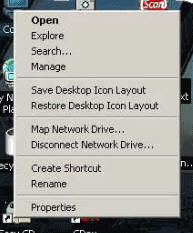
Icon Restore lets you save and restore your Windows desktop icon layout at the click of a mouse button. Well actually you need to right mouse click on My Computer and select Save Desktop Icon Layout. Then if your icons get scrambled you restore them by doing the same process and selecting Restore… Neat.
After installing Icon Restore, simply place your icons wherever you want them on your desktop, right click My Computer (or any ‘system’ icon) and left click on “Save Desktop Icon Layout” from the pop up menu. If your icons ever get moved because your computer entered safe mode or you changed the screen resolution, right click My Computer (or any ‘system’ icon) and left click on “Restore Desktop Icon Layout” from the pop up menu. Icon Restore is the perfect solution for people that have to change the screen resolution often.


![A little hands on time with the cinimizer OLED Multimedia Video Glasses [E3 2013]](http://www.redferret.net/wp-content/uploads/2013/06/IMG_5499-270x190.jpg)


![Revell Cager – impact proof flying fun for all the family [Review]](http://www.redferret.net/wp-content/uploads/2013/06/revellcager-1-270x190.jpg)


![Sony Xperia Z 4G Tablet - hands on with Sony's superb new iPad killer [Video Review] sonyxperiaztablet9 150x150 Sony Xperia Z 4G Tablet hands on with Sonys superb new iPad killer [Video Review]](http://www.redferret.net/wp-content/uploads/2013/06/sonyxperiaztablet9-150x150.jpg)

![Earth Alerts - live map of our planet's natural hazards makes for compulsive viewing (+Freeware] earthalerts2 150x150 Earth Alerts live map of our planets natural hazards makes for compulsive viewing (+Freeware]](http://www.redferret.net/wp-content/uploads/2013/06/earthalerts2-150x150.jpg)


