
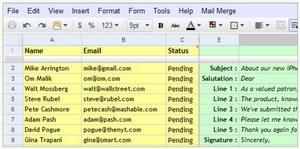
This short-ish tutorial on how to set up Gmail to send out personalized messages to a group of recipients on a list, is very useful stuff, especially if you run a small community, club or company mailing list. Or even if you suspect you’re going to need to send out a large wedding or birthday invitation email one day. I’m definitely bookmarking it for future reference. [Via]
All your email messages will essentially have the same content but some elements will be unique (like the recipient’s name) in every copy. For instance, when you are sending a casual email to friends, you might want to have “Hi [Friends’s nickname]” as the greeting while in the case of customers, you will prefer a more formal greeting with their first names.




If you want something more advanced (complicated?), we have a script which allows you to insert user-defined fields into the text (rather than only merging in a name, you can merge in as many fields as you like), and also allows multiple attachments.
See
http://www.it4smallbusiness.co.uk/web-application…
The sheets and script are free to use/copy/modify.