
Bookmark This! posted by

How to Quickly Shut Down a Hung Windows Application


hungprogram small How to Quickly Shut Down a Hung Windows Application

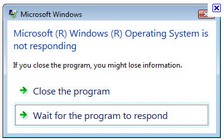
How to Quickly Shut Down a Hung Windows Application. Ladies and Gentlemen, if all else fails with an unresponsive Windows program, let us introduce you to ‘taskkill’.

 Sometimes a Windows program or file will hang and just sit there frozen with none of the menus or functions responding to the mouse or keyboard. There are several ways to close down a hung process but the command prompt provides a very quick and easy one with “taskkill”.



 How to Quickly Shut Down a Hung Windows Application

About the Author:

Nigel is the managing editor of the Red Ferret, as well as a freelance columnist for the Sunday Times newspaper in London. Loves tech and fancies himself as a bit of a futurist, but then don't we all?

Nigel – who has written posts on The Red Ferret Journal.


Comments are closed.

comments powered by Disqus

Chinese (Simplified)EnglishFrenchGermanItalianJapanesePortugueseRussianSpanish

FB Like Box

Personnel

Managing Editor:
Nigel Powell

Associate Editor:
Caitlyn Muncy
Associate Editor:
Dan Ferris
Ecological Editor:
Debra Atlas
Reviews Editor:
Kevin Evans
Technology Editor:
Fritz Effenberger
Asian Editor:
Hu Ping

Red Ferret Video Reviews

Review Partners

Brando FocalPrice
Firebox Chinavasion