
Do the people in your house (or office) waste too much time playing Facebook? Have you ever wanted to make sure they couldn’t play them, but still allow them to browse the social network? As it turns out, there is a way to do it, so long as you don’t mind messing with some settings on your router.
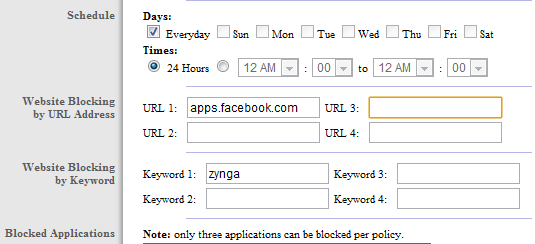
The guys over at MakeUseOf have put together a great guide on how to block most Facebook games on your network. One of the easiest ways is to simply add a rule that blocks a specific word from appearing in a URL. Naturally, Zynga is a good one to block, since they make roughly a million games. Another effective way is to actually block the url apps.facebook.com. This will prevent access to any and all Facebook apps. You’ll probably want to give everyone a heads-up when you put these into effect, as you’ll probably have some upset people on your hands.




)
I have tried this and noticed it works well on the second game. However on the first game it is played in the same session as when you login, which happens in a SSL (secure/encrypted session) and therfore is not blocked as the router can't see the URL.