

Eric Wong’s Open Source Circle Dock program gives Windows users the same kind of cute, useful application launch functionality as the Apple Mac dock, but arranged in a circular motif rather than along the bottom of the screen. As well as looking very pretty, it is ultra-configurable, and offers mouse wheel rotation to make it Lazy Susan easy to get to your favourite applications fast. It is also multilingual and needs the .NET framework to be installed. Please note that this is Alpha level code, so you install at your own risk!
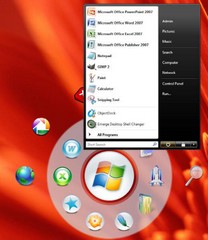
Launch your programs from a circular dock. # Drag and drop your files, folders, and shortcuts onto a circular dock that you can resize. # Rotate the dock with either your mouse wheel or the keyboard arrow keys. # Change the image shown for the icons and change the skins (compatible with icons and skins for Rocket Dock, Object Dock, etc.) # The dock appears where your mouse is by pressing a hotkey (default is F1) or your middle mouse button.



