
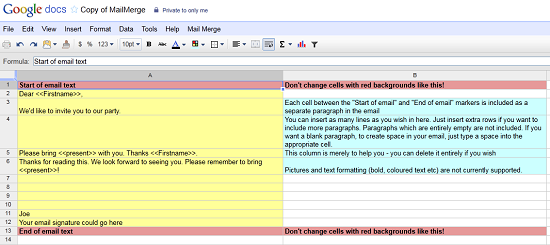
Have you ever needed to send out an email to a large group of people? It’s pretty easy to just enter in all of the necessary email addresses and hit �send,� but what if you need to personalize each one of them? If you want to give more of a personal touch to each one, you’ll need to send individual emails and edit things like the name in your salutation. Doing this can eat up a lot of time, however, there is a neat little tool that you can use in Gmail to help with this.
A company called IT4SmallBusiness has put together a handy tool (in the form of a Google Document)� that will help you personalize a batch of emails. You’ll put in your original email, and then fill in various fields that will be personalized. Things such as their name, email address, and other things can be entered. Once you’ve told the document where you want them entered, you can can test the settings to make sure it looks right. When you’re satisfied, run MailMerge, and your emails will be sent.





Just to add, we've recently updated the script (January 2012) so you can now use mailmerge fields in the subject line. If you've already copied the script, you'll need to make a new copy to get this new feature.
Do the sent messages show up in your Gmail "Sent Items" folder?