
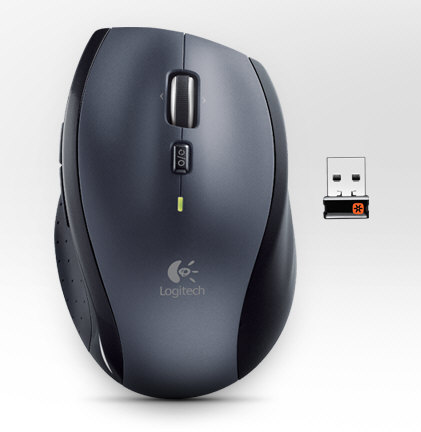
Bookmark This! posted by

The Logitech Mouse Double Click Problem and How To Fix It!


logitechmouse The Logitech Mouse Double Click Problem and How To Fix It!

We’ve long had a love hate relationship with Logitech mice. On the one hand they’re ergonomically designed and feature the wonderfully useful hyperscroll wheel for sweeping through documents and web pages, but on the other they suffer from a fundamental fault after a few years of use, when the mouse buttons start to fail (note that other mice also seem to suffer from the problem, although we’re not sure whether that’s because they’re OEM models made by the Logitech factory).

Despite our rant four years ago, little seems to have changed, and the other day yet another mouse here, an  M705, started failing again for the same reason. The symptoms are that the mouse click delivers two clicks for one press, which can be extremely annoying and renders the mouse unworkable for important tasks. This time, however, instead of consigning the device to the trash and buying another, we decided to see if we could solve the situation with a bit of DIY. And the answer is yes!

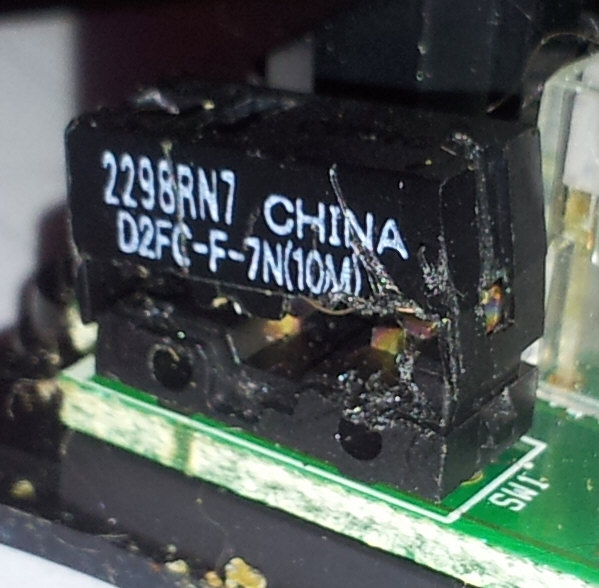
A quick search on Google revealed that other more intrepid souls had managed to fix their own meeces, and so we got to work on two ‘dead’ mice lying around in Ferret Towers, a Logitech M705 and an older MX Revolution. The first thing to note is that the culprit is tiny, a sliver of copper which can’t be worth more than £0.02p.
logitechmouse1 thumb1 The Logitech Mouse Double Click Problem and How To Fix It!

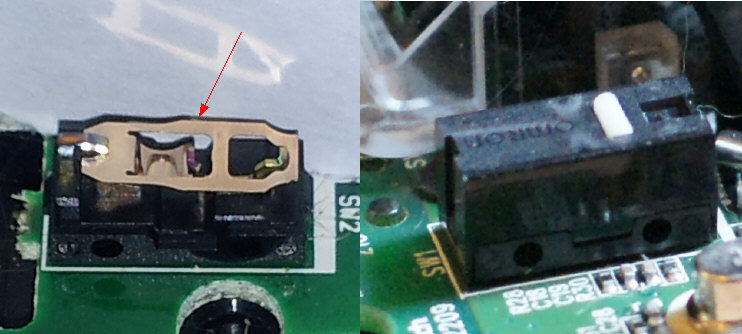
The actual spring mechanism is a tiny piece of intricately designed copper (top left in the image above) which sits inside the black microswitch housing on the right. What seems to happen over time is the copper flattens out through repeated clicking and once that happens, you start getting unpredictable results and double clicks etc. To fix the problem, you need to dismantle the mouse, open up the black switch casing and restore the bends in the copper to the original shape.

It’s hard but not impossible to do. You’ll need a steady pair of hands, patience and a small screwdriver and thin knife or blade. I fixed the two mice, the first took me 2 hours or so, the second (the M705) one hour. To be fair, I’m including here a link to the original Overclockers.com forum post I used, where they fixed a Logitech G7 mouse, so I won’t repeat everything. Just give a quick overview of the task for the M705. Click on the thumbnails to expand the image.

Oh and the usual disclaimer: You do this entirely at your own risk, DO NOT attempt it if you’re not at ease with electronic DIY and we are absolutely not responsible for what happens to your mouse, warranty, lifestyle or flowerbeds as a result.

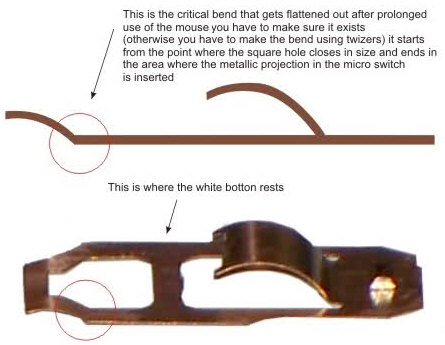
The key thing to read and remember by the way is this comment. It is essential that you restore that tiny curve at the end of the copper mechanism before reinserting it.
logitechmouseCopperBend thumb The Logitech Mouse Double Click Problem and How To Fix It!

Steps.
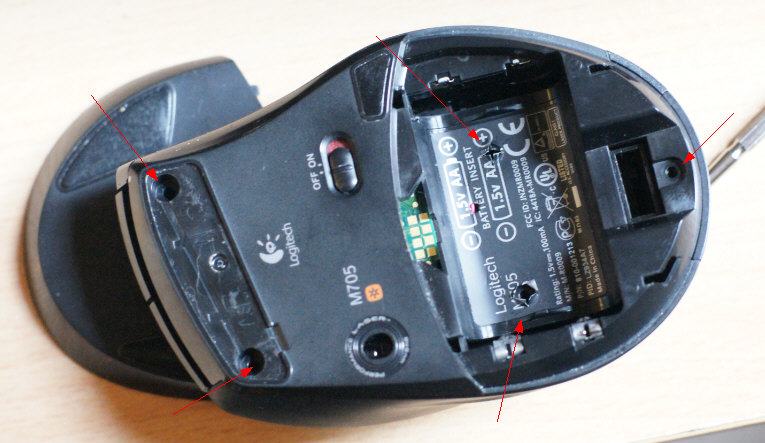
1. Unplug and dismantle mouse. You’ll usually find around 5 screws under the rubber feet and/or under labels. On the M705 they’re as arrowed below.
Logitechm705repair

2. Once they’re removed you just carefully prise the mouse apart, taking care to gently remove the connected wire from the side.
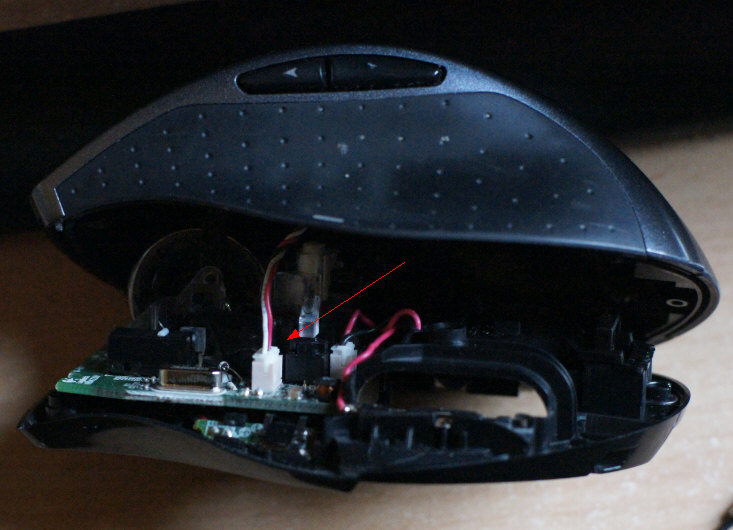
Logitechm705repair2

3. Once open, you’ll see the switch boxes (left and right mouse buttons) in front of you. In most cases the most common problem will be the left mouse button since that gets used the most.
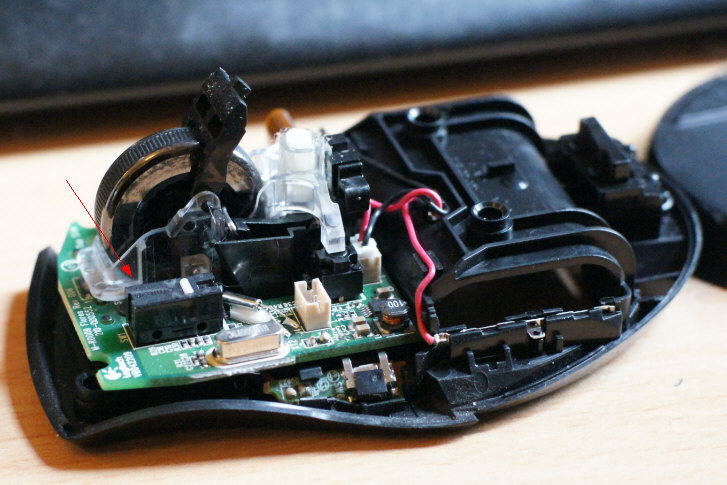
Logitechm705repair3

To remove the switch box cover you’ll need to get a thin blade under the catch on the sides (A), and gently (careful, they break!) lift the top (B) away from the switch body and upwards to prise it open.
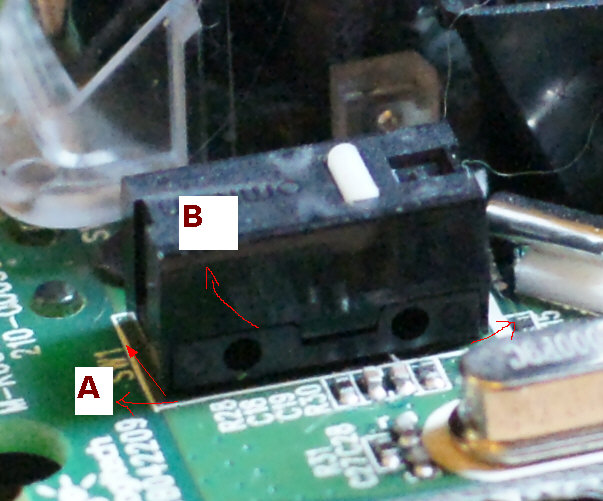
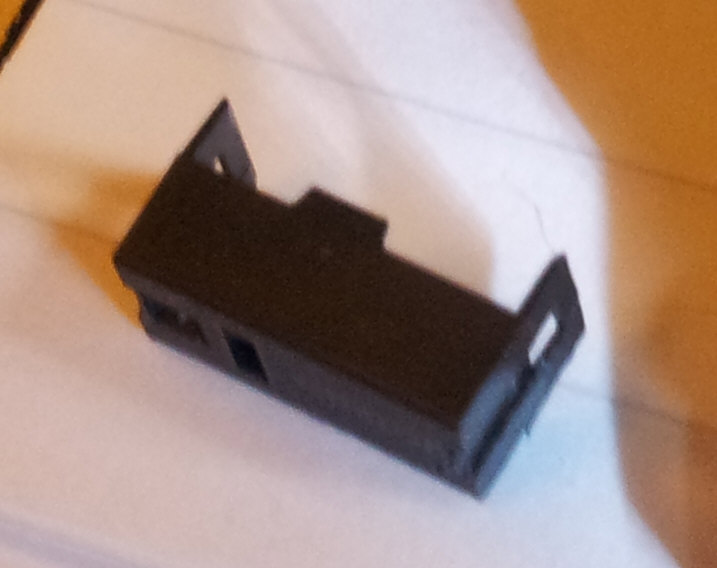
Logitechm705repair4

Logitechm705repair6

My earlier attempt on the MX Revolution mouse below (easy to scratch the cover getting it off, especially if you’re clumsy like me, but as long as you dont break the end catches, it’s fine.
Logitechm705repair7jpg

4. Once open, you’ll see the copper switch, which you remove with a gentle sideways push to dislodge it from its position.

Logitechm705repair5

5. Now make sure the copper spring switch is flat, but with the nice curve on the middle curved part and a upward kink at the end as per the forum post above. The copper is very thin and malleable, so be careful, you can break it with just a bit too much pressure with your finger nail. In fact just a gentle tweak with a fingernail edge or a pair of tweezers is all you need.

6. To insert the copper spring back, put the front part of the spring back first (A), then gently curve the rear upwards and slide the whole thing into place under the rear catch.

The thing that confused me the most, until I opened the other switch to compare, is that the spring at point (A) actually slots into a tiny slot which catches and holds it. The other end just slides under the catch, so it’s different at both ends. Then the curved bit in the middle (C) slots into another slot in the middle to give the whole thing some tension. The end result should be that you can press down on point (B) and hear a distinctive click. If you can’t the thing isn’t installed properly, so you’ll have to keep fiddling until you find the tension.

See this video to get an idea:

This bit is undoubtedly the most fiddly part of the whole exercise, but once you get it right you’ll not forget for the next time. If you get stuck, re-read the whole of the above forum post again, all the clues are in there.  If you lose the spring in error (they do tend to ping away if you’re not careful, you can pick up spare switches from eBay which should have the same copper spring inside.

7. Finally, reassemble the mouse in the reverse order and give it a test. You’ll be amazed at the fact that the thing works again properly. I should also mention that the forum post mentions a free software utility called MouseFix which is supposed to fix the problem with double clicking mice, but it’s very old and there’s no guarantee that it will work with anything other than Windows XP. Good luck.



About the Author:

Nigel is the managing editor of the Red Ferret, as well as a freelance columnist for the Sunday Times newspaper in London. Loves tech and fancies himself as a bit of a futurist, but then don't we all?

Nigel – who has written posts on The Red Ferret Journal.


  • J.R.

    Thanks for a well timed article. I just followed the instructions and fixed my Logitech mouse.

    • http://www.redferret.net Nigel Powell

      Oh very cool. :)

  • Debra

    I exclusively use Logitech mice that are starting to get old. I'm definitely bookmarking this for future use!

    • http://www.redferret.net Nigel Powell

      Excellent! :)

  • http://www.overclockers.com I.M.O.G.

    Glad the forum post was helpful Nigel. I would prefer if you didn't use our image from the forum member in this post, and just linked to the forum post where people can find it. Can you please make that change?

    That forum thread is from 2009. We published our original article on this in 2005, which may also be relevant: http://www.overclockers.com/mouse-clicking-troubl

    • http://www.redferret.net Nigel Powell

      Hiya, I'm trying to make sure that the user experience for the process is as easy as possible, so I've done both.

      If you look just above the image there's a direct link to the comment itself which features the image. And I've linked to your site three times on the post, does that satisfy your traffic potential? :)

      It's a great set of posts from Overclockers, and I hope people visit you and compare experiences with mine to get the full story, so I don't want to annoy you guys. :)

  • engin yılmaz

    amazing excellent post..!

    There are symptoms that one click but works double click in my M705.

    I just followed the instructions step by step and fixed my Logitech M705 mouse. Now it is working as first time use.

    This is first blog post for me that is very vey helpful.

    Nice post.

    • http://www.redferret.net Nigel Powell

      Glad we could help Engin. :)

  • swc

    I guess I just didn't hold my mouth right – I could not get it back in after I bent the spring the slightest amount – I was able to get it close but could never get it to click right after I put the black case back on – back to my wired mouse or something else besides this model. I have only had this M705 about 6 months and quite disgusted that is failed it such a short time.

    • http://www.redferret.net Nigel Powell

      My best advice is not to give up. It took me ages to understand how it works first time. You've got to get one end 'latched in' and then the other end in and you'll see how it works. What I did in the end was open up the other switch (for the right hand mouse button) and looked at it closely to see how it fitted in, without touching anything. I then reflattened and curved my spring to the same shape and put it in exactly the same way. And it worked! Don't give up! :)

      • swc

        Yep – did that too – good tip! Even after looking at the other one, I just could get it to click right – I got it installed but I could get the white button to click like it was supposed to – just ordered M505 over the weekend – hopefully it will not do the same thing in the short haul!
        Thanks!

  • frEmn

    Great article. I just made an instructable for this same problem. I didn't take as much time analyzing the copper piece, so I assumed it was the tension of the curved tab getting low, as opposed to the end that attaches to the hook. Either way, it seems people are having good results with your instructions. Here is a link to my instructable. There are quite a few pictures that may help people out during their repair. – http://www.instructables.com/id/Repair-mouse-with

    • http://www.redferret.net Nigel Powell

      Cool stuff, glad to see the knowledge getting passed around. :)

  • Jep4444

    For those who don't want to take their mouse apart. Lowering click settings in Control Panel > Mouse seems to work as well.

  • Thomas

    Awesome! This has saved me from a lot of future frustration! Thanks a lot Nigel!

    • http://www.redferret.net Nigel Powell

      It's our pleasure Thomas. :)

  • aaa

    thanks i fixed my wireless mouse !

  • decoding

    Many thanks for explaining where the invisible screws are on the M705!
    I fixed mine simply by cleaning the click button area on the inside.

  • Wind

    I have 4 m705 mice , one with a bad switch the others without . Most people do not have the button wear issue but a software issue. Oddly enough i went into game settings in Logitech's set point then changed it to os implementation on speed and acceleration. After i did this it stopped doing the double click . I also noticed on machines without the software loaded on the problem does not exist . I believe it's both faulty software and cheap switches .

    • http://www.redferret.net Nigel Powell

      That's not exactly true. Neither of my Logitech mice were running the software and they both failed. It has nothing to do with software settings.

      • JinX

        I just did as wind suggested and my mice works fine now. after 2 weeks of think of throwing it at the wall

  • Jack

    Have used this post twice now to fix my left click on my Logitech G500, thought I would say thanks as you have saved me from buying two new mice (taking it apart was my last option). Apart from it being very fiddly to do its not hard at all. Thank you Nigel.

    • http://www.redferret.net Nigel Powell

      It's a pleasure, Jack. Glad you found it useful. :)

  • Sharker

    I dont remove copper foil, just clean it and looks it works again normal :)

  • Moe

    Kudos for a great article. I couldn't imagine a slight flattening could cause all the troubles I had with my M705 mouse which I used to love. Thanks for bringing me and my wireless mouse together after months of separation. This is why I love the internet man!

    • http://www.redferret.net Nigel Powell

      Glad we could help. :)

  • http://blog.jarfil.net jarfil

    I've just followed these instructions, and it worked like a charm.

    I used a tiny screwdriver to slightly pry one of the plastic tabs on the swtich, and the top came off without even a scratch. Just be carefull and don't lose the tiny white piece as it falls out.

    In my case, the copper piece was not so much flattened on the bend, but more like slightly bent on the flat part. So I used some nose pliers to apply some pressure along the flat part to flatten it out, then grabbed the bent part just below the bend and bent that slightly.

    When putting it back together, just remember which side goes where. I found it easier to put the cover back on, by flipping everything upside down, putting the white part in its place in the cover, and then lowering the mouse inside, instead of trying to balance the white part in its place while lowering the cover.

    • Nigel

      Thanks for the feedback. One trick people have used to secure the tiny and very fiddly white button is to lick it to moisten it and then place it back in position on the cover. Because of the spittle it stays in place long enough to replace the cover correctly. Sorry if it sounds a bit yucky. ;)

  • Billy

    Thanks for posting this. Worked like a charm. As previous poster stated, the M705 has a non- curved copper spring. Straightening any bend on the end opposite the contact, is what fixed it for me.

    ~Billy

  • purelywasted

    Thanks for the great post, thought it was at the end of its life, I had the flattened peice as well, but put a slight bend with tweezers, now works as new.

  • Pro-Fresh

    Super Thanks! was able to keep my lid to the left-click button, big ups to you!
    Thanks
    Pro-Fresh

  • net-connect

    many thanks… my mouse works again ;-)

  • Emre

    Thank you very much!. 2 of my mouse started working again… :)

  • flywheel

    Screw location was a great help! but note that the pads are not very keen on being removed make sure you dig down a little right to the bottom of the adhesive or they split away from the adhesive and gives you another prob. to solve.

    fyi i cleaned out my flywheel which had accumulated detritus at the bottom of its housing its tricky to take apart but entirely doable.

    the flywheel has its own see through housing which comes away without unscrewing, it is held in place with a small push pin at the top rear of the mount. to get the wheel out i removed the housing and whilst holding it upside down, pry both sides apart, but make sure to lever the little metal spring arm (adds the friction to the wheel when you click the ext button) out of the wheel so that it can fall free.

    great article thanks.

  • Allison

    Thanks for saving my M305! I don't think its necessary to remove the copper piece. If I have to do this again I think I'll try to kink the end without removing it, since it's a b*tch to get to snap back in. I actually did it by very slightly making the middle curve (C) bigger, since ironically, in the process of bending the "A" part I flattened that a bit. Then I put the rear end (opposite of "A") in first, then held the "C" part in its tiny groove, then nimbly snapped the "A" part into its tiny groove. Anyway, you can avoid all of that if you can avoid removing the copper piece altogether. And as someone else said, to replace the copper piece housing, it's easiest to reassemble upside down: place that tiny white piece in the slot, then put the whole mouse on top of it.

  • Francine

    Another mouse saved! Thank you!

  • http://webart-design.net ionuke

    Worked like a charm on my M505!

    Might also be of interest: one of the pads on the bottom of my mouse lost its stickiness completely (as I dismantled the mouse 3 times now). So I used rubber adhesive to glue it back to position. The advantage of the rubber adhesive in this case is that it doesn't affect the plastic surface of the mouse casing and also does nothing to the pad itself. This type of adhesive also allows for later removal of the pad if needed as it provides just enough fastening to keep the pad in place for everyday (or even harsher) use.

  • Zafer

    Also another mouse saved! Thank you from Russia!

    • http://www.redferret.net Nigel Powell

      Pazhalsta :)

  • Anders

    Worked, thanks!

  • Marco

    Thanks for the article. It took me about 20m to fix my M505 :)

    The copper plate didn’t had the bend A, so I did the next sensible thing and switched the plate from left to right.

comments powered by Disqus

Chinese (Simplified)EnglishFrenchGermanItalianJapanesePortugueseRussianSpanish

FB Like Box

Personnel

Managing Editor:
Nigel Powell

Associate Editor:
Caitlyn Muncy
Associate Editor:
Dan Ferris
Ecological Editor:
Debra Atlas
Reviews Editor:
Kevin Evans
Technology Editor:
Fritz Effenberger
Asian Editor:
Hu Ping

Red Ferret Video Reviews

Review Partners

Brando FocalPrice
Firebox Chinavasion