

The one thing that most people try and accomplish in their lifetime, apart from fostering world peace and rearing angelic offspring, is to carry around less stuff when they travel. This includes things like computer accessories – it’s just so much hassle packing dongles, cables, chargers and a mouse for a weekend getaway. Now there’s a way to carry less using some freeware and our cell phone.
WiFi Mouse is a free Android app which lets you control a PC or Mac from your smartphone. It’s actually a bit of a misnomer, because it turns the phone into a trackpad rather than a mouse, but there are some features of the software which are extremely cool indeed.
For one thing it works extremely well. Once you’ve installed the app on your phone, you’ll need to download and install the server component onto your PC or Mac. It takes a couple of minutes to do, and then you’re set. Fire up the app, hit the Autoconnect button and bingo, your phone is now a fully functioning trackpad for your computer (as long as both phone and computer are connected to the same WiFi network).
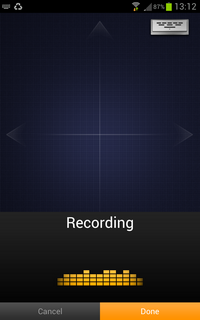
Now here’s where the fun starts. As well as supporting two finger and center button scrolling, the software also handles Swype, which means you get all the power of fast text input without having to use a keyboard (there’s a keyboard in the app by the way). I’m using the awesome Swype Beta app at the moment, which means that I can also do voice recognition data input, and the WiFi Mouse app even supports that part of Swype, which is amazing!

To make this work, I just hit the keyboard button top right, then click the voice transcription button at the bottom right of the keyboard which appears and start talking. The text then magically appears in my computer program just as if I transcribed it using a speech recognition program and microphone. Very cool indeed. And it’s free remember?
So, one less thing to carry, one more chunk of functionality to bolt onto your traveling computer environment. Win-Win. For real road warriors, there’s a commercial Pro version of the app which provides multi-touch selection, pinch to zoom and three finger drag for navigation.




